
By Ethan Bae | Settle Rich
Checking your TFSA and RRSP contribution room is something every Canadian should do at least once a year — but do you actually know how much room you have left? A lot of people don’t. And if you go over your limit, the CRA charges a 1% penalty per month on the excess. That adds up fast.
The good news is that checking your TFSA and RRSP contribution room takes about two minutes. Here are three ways to do it, starting with the most accurate.
If you’re new to the TFSA, check out our complete TFSA guide for newcomers first.
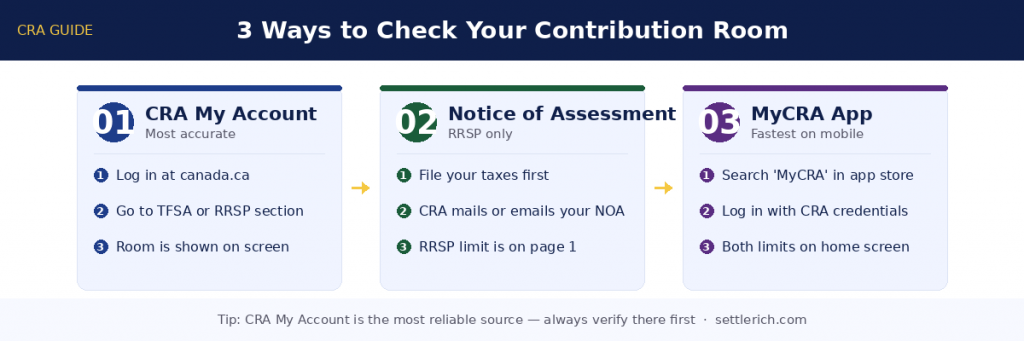
Method 1: Check Your TFSA and RRSP Contribution Room via CRA My Account
CRA My Account is the most accurate way to check your TFSA and RRSP contribution room — here’s exactly how to get there.
- Go to canada.ca and log in to CRA My Account
- For your RRSP: look under the “RRSP and FHSA” section — your deduction limit is listed there
- For your TFSA: click “Tax-Free Savings Account (TFSA)” in the left menu
- Your available contribution room is shown on that page
⚠️ The TFSA number on CRA reflects your situation as of the end of the previous year. If you’ve contributed or withdrawn since January, that won’t be reflected yet. Keep your own records on the side.
Method 2: Your Notice of Assessment (NOA)
Every time you file your taxes, the CRA sends you a Notice of Assessment. Most people glance at it and forget it exists — but it’s actually one of the more useful documents you’ll receive.
Your NOA shows your RRSP deduction limit for the current year, including any unused room carried forward from previous years. You can find it in CRA My Account under Tax returns → Notice of Assessment, or check your email if CRA sent it electronically.
One thing to know: your TFSA room isn’t on the NOA. For that, you’ll need My Account or the app below.
Method 3: The MyCRA app
If you’re on your phone, this is the fastest option. It’s the CRA’s official mobile app and it’s free. Once you’re logged in, both your TFSA room and RRSP limit are right on the home screen — no digging required.
Available on iOS and Android. Just search “MyCRA” in your app store.
What about checking through Wealthsimple or Questrade?
Your brokerage app might show contribution room, but treat that number carefully. These platforms only see what you’ve contributed through them. If you have a TFSA at your bank and another at Wealthsimple, neither one knows about the other.
Always use CRA My Account as your source of truth. Broker apps are a convenience check, not a definitive answer.
The withdrawal rule newcomers often miss
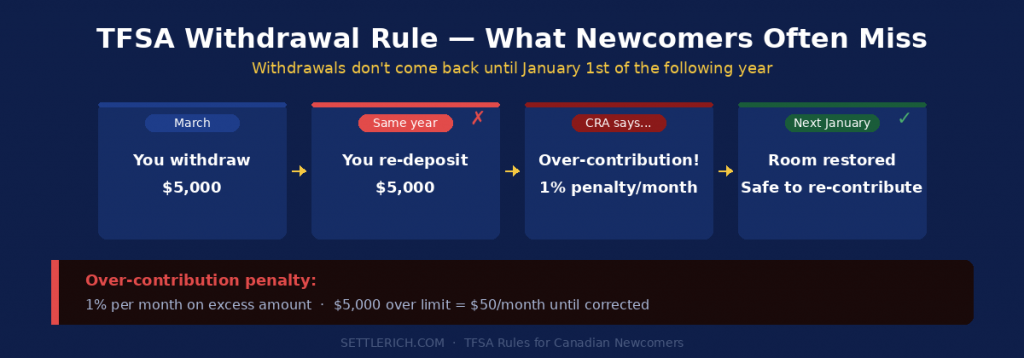
When you withdraw from your TFSA, that room doesn’t come back until January 1st of the following year. This catches a lot of people off guard.
Say you pulled $5,000 out in March to cover an expense. You can’t re-contribute that $5,000 until the new year — even if your CRA page shows room available. Put it back too early and the CRA treats it as an over-contribution, charging 1% per month on the excess amount until it’s corrected.
🚨 Over-contribution penalty: 1% per month on the excess amount. On $5,000 over the limit, that’s $50 every month until you fix it.
Ready to put that TFSA and RRSP contribution room to work?
Now that you know your TFSA and RRSP contribution room, it’s time to put it to work. Wealthsimple is one of the simplest platforms to get started — commission-free trades, a clean app, and built specifically for Canadians.
Use our referral link below and you’ll get $25 deposited into your account when you make your first deposit. No minimum required — $1 is enough to qualify.
[BUTTON: Sign Up & Get $25 Free → wealthsimple.com/invite/HXA5P7]
Disclosure: This is a referral link. We may receive a bonus if you sign up through this link, at no extra cost to you.